

Guide
Wednesday, March 25, 2026
Retrieving Data from the Software Heritage S3 Graph Dataset Using Amazon Athena

Software Heritage (SWH) is one of the most ambitious efforts to archive the world's source code. The idea is simple: collect everything, keep it long-term, and make it accessible, not just for today, but also for future generations of researchers and developers. Beyond that, it also serves as a powerful resource for large-scale code analysis.
In this guide, we explore how to use the SWH Graph Dataset on Amazon Athena, using the retrieval of README files from GitHub repositories as an example. We cover the full traversal path, the filters we apply, how results are written to a user-owned AWS S3 bucket, and the potential cost of running this workflow.
Mission of Software Heritage
For over a decade, SWH has been archiving publicly available source code from across the internet. Today, the archive holds billions of source files spanning millions of repositories. These are stored as a fully deduplicated Merkle DAG in Apache ORC format, accessible through public S3 buckets on AWS. Instead of simple repository snapshots, it models software as a graph where every object is hash-addressed and deduplicated, making it highly reproducible.
Prerequisites
Before we get started, you'll need to make sure you have access to the following:
- An AWS account with an IAM user or role
- Correct permissions attached to your IAM user or role
Set up AWS S3 bucket
- Create (or confirm) an S3 bucket for Athena outputs
aws s3 mb s3://<your-bucket-name> --region us-east-1
- Verify that your IAM role or user has the required S3 permissions for Athena result storage:
  athena:StartQueryExecution, athena:GetQueryExecution, athena:GetQueryResults, athena:StopQueryExecution
  glue:GetTable, glue:GetDatabase, glue:GetPartitions
  s3:PutObject, s3:GetObject, s3:ListBucket
Step 1. Accessing the Software Heritage Graph
We start by creating an external Athena table pointing to the Software Heritage latest snapshot (2025-10-08, at the time of writing) to query the origin data.
CREATE EXTERNAL TABLE IF NOT EXISTS swh_graph_2025_10_08.origin (
    id STRING,
    url STRING
)
STORED AS ORC
LOCATION 's3://softwareheritage/graph/2025-10-08/origin/';
Once the Athena tables are set up, the goal is to retrieve repository URLs, visit dates, and SHA-1 identifiers. To do this, it helps to understand the SWH graph schema, shown below:
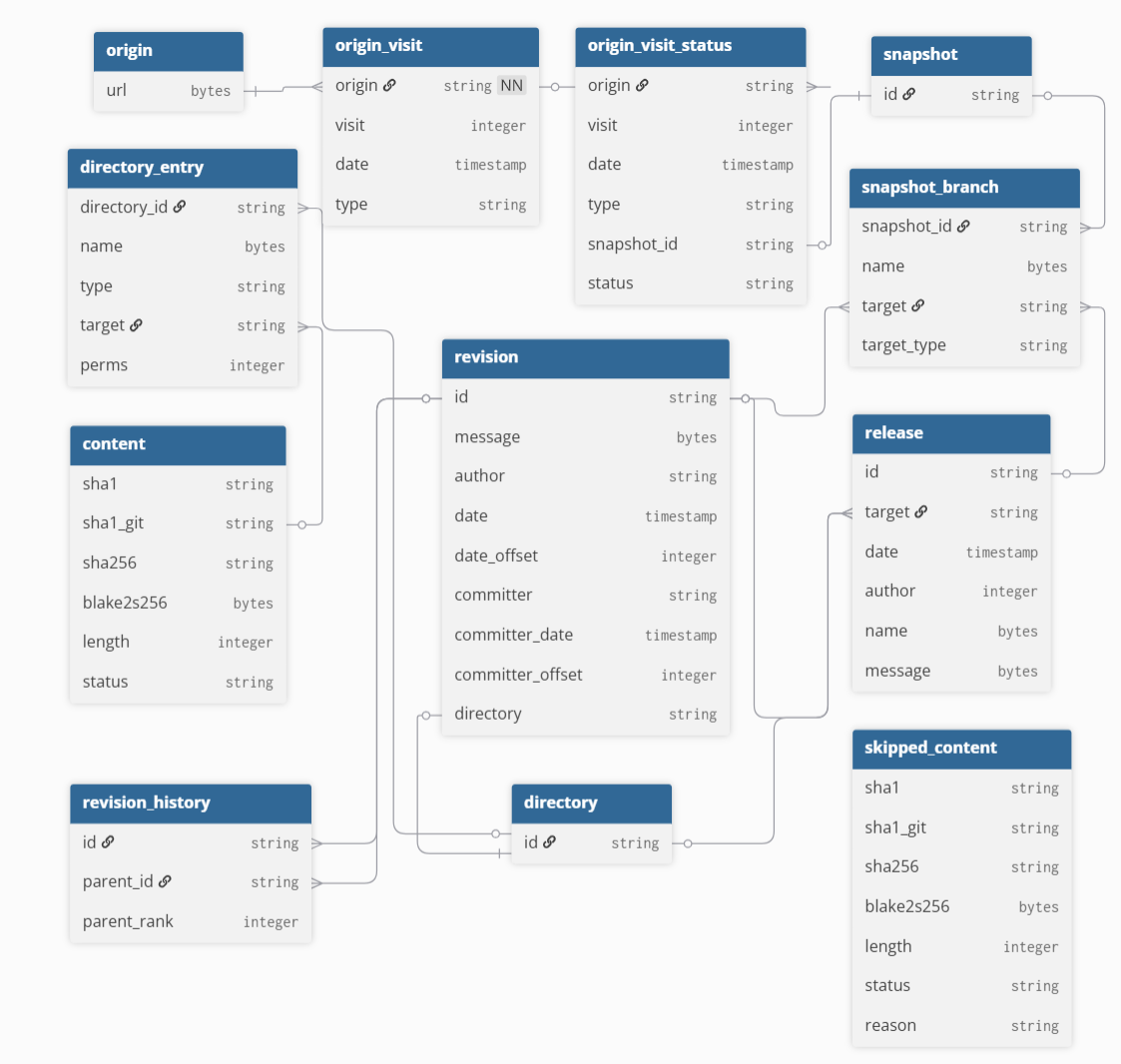
An initial attempt might look like joining six tables as shown below:
-- Initial attempt: single-pass join (exceeded resource limits)
SELECT o.url, ovs.date AS visit_date, c.sha1 AS content_sha1
FROM swh_graph_2025_10_08.origin o
JOIN swh_graph_2025_10_08.origin_visit_status ovs ON o.url = ovs.origin
JOIN swh_graph_2025_10_08.snapshot_branch sb ON ovs.snapshot = sb.snapshot_id
JOIN swh_graph_2025_10_08.revision r ON sb.target = r.id
JOIN swh_graph_2025_10_08.directory_entry de ON r.directory = de.directory_id
JOIN swh_graph_2025_10_08.content c ON de.target = c.sha1_git
WHERE sb.target_type = 'revision' AND de.type = 'file';
This query runs into Athena's resource limits quickly. The SWH tables are large and unpartitioned, and without traditional indexing, joining multiple large tables at once significantly increases scan and shuffle costs. More details on the dataset structure can be found in the SWH article.
To address this, we break the process into incremental steps, storing results in tables along the way.
Step 2. Extracting Repository URLs and Visit Data
We start with the origin table, pulling around 400 million repository URLs, then stage intermediate results to progressively narrow the working set. From origin_visit_status, we extract around three billion visit records, each representing a crawl attempt and its associated snapshot.
CREATE TABLE default.url_and_date AS
SELECT
    o.url,
    ovs.date AS visit_date
FROM swh_graph_2025_10_08.origin o
JOIN swh_graph_2025_10_08.origin_visit_status ovs
    ON o.url = ovs.origin;
    ON o.url = ovs.origin;
Using these dates, we then retrieve the snapshot identifiers:
CREATE TABLE default.url_date_snapshot_2a AS
SELECT
   u.url,
   u.visit_date,
   ovs.snapshot as snapshot_id
FROM default.url_and_date u
JOIN swh_graph_2025_10_08.origin_visit_status ovs
   ON u.url = ovs.origin
   AND u.visit_date = ovs.date
WHERE ovs.snapshot IS NOT NULL;
Step 3. Linking Snapshots to Revisions and Directories
After obtaining the snapshot IDs, a direct export of the snapshot_branch table hit Athena's resource limits, so we filter for main and master branches only. Note that repos using a different default branch name may be under-represented.
CREATE TABLE default.snapshot_branch_filtered AS
SELECT
    snapshot_id,
    target AS revision_id
FROM swh_graph_2025_10_08.snapshot_branch
WHERE target_type = 'revision'
  AND (
      name = CAST('refs/heads/main' AS VARBINARY)
      OR name = CAST('refs/heads/master' AS VARBINARY)
  );
After filtering, we obtain snapshot branches, and revision tables.
CREATE TABLE default.url_date_branch_2b AS
SELECT
   u.url,
   u.visit_date,
   sf.revision_id
FROM default.url_date_snapshot_2a u
JOIN default.snapshot_branch_filtered sf
   ON u.snapshot_id = sf.snapshot_id;


CREATE TABLE default.url_date_rev_2c AS
SELECT
   b.url,
   b.visit_date,
   r.directory as directory_id
FROM default.url_date_branch_2b b
JOIN swh_graph_2025_10_08.revision r
   ON b.revision_id = r.id;
Step 4: Extracting README Entries
This is the most expensive step, as the directory_entry table is one of the largest in the dataset at around 24 TB. To keep it manageable, we filter for just four README filetypes by matching their hexadecimal filename encodings.
CREATE TABLE default.directory_entry_readme AS
SELECT
    directory_id,
    target AS content_sha1_git
FROM swh_graph_2025_10_08.directory_entry
WHERE type = 'file'
  AND name IN (
      X'524541444D452E6D64',
      X'726561646D652E6D64',
      X'524541444D45',
      X'524541444D452E747874'
  );
Step 5. Resolving Git SHA-1 to Canonical SHA-1
Once we have the directory-level sha1_git values, we split the remaining work into three steps. First, we pull the distinct content_sha1_git values from the intermediate table. Then we join this smaller set against the content table to get the matching sha1_git and sha1 pairs. Finally, we join everything back with the original URL and date. Breaking it up this way keeps join sizes manageable and avoids resource exhaustion errors.
CREATE TABLE default.url_date_directory_sha_3b AS
SELECT
    u.url,
    u.visit_date,
    d.content_sha1_git
FROM default.url_date_rev_2c u
JOIN default.directory_entry_readme d
    ON u.directory_id = d.directory_id;


CREATE TABLE default.filtered_directory_sha1 AS
SELECT DISTINCT content_sha1_git
FROM default.url_date_directory_sha_3b;
CREATE TABLE default.content_matched AS
SELECT c.sha1_git, c.sha1
FROM swh_graph_2025_10_08.content c
JOIN default.filtered_directory_sha1 f
   ON c.sha1_git = f.content_sha1_git;


CREATE TABLE default.url_content_final AS
SELECT d.url, d.visit_date, d.content_sha1_git, cm.sha1
FROM default.url_date_directory_sha_3b d
JOIN default.content_matched cm
   ON d.content_sha1_git = cm.sha1_git;
By following the steps above, you can retrieve GitHub repository records and store their URLs, visit dates, and SHA-1 identifiers in an intermediate table. In our run, this resulted in over 450 million records.
Step 6. Deduplicating Repositories
We then deduplicate the URLs, keeping one record per repository using the most recent visit date, with MAX_BY ensuring the content hash matches that latest snapshot.
CREATE TABLE default.filtered_github_total_table AS
SELECT url, content_sha1_git, sha1, visit_date
FROM url_content_final
WHERE url LIKE 'https://github.com/%';

CREATE TABLE default.filtered_github_unique AS
SELECT
   url,
   MAX_BY(content_sha1_git, visit_date) AS content_sha1_git,
   MAX(visit_date) AS visit_date
FROM default.filtered_github_total_table
GROUP BY url;
As a result, the dataset is reduced to approximately 225 million rows. After excluding records with empty sha1_git values, the final dataset contained approximately 223 million rows.
Computational Cost Breakdown Across Processing Steps
Working with a dataset of this size comes with real costs. Athena charges $5 per TB scanned, and while the SWH dataset itself is free to query, any intermediate tables are stored in a user-managed S3 bucket (~$0.023 per GB/month at the time of writing). The approximate cost breakdown for each step, based on our run, is shown below:
| Step | Stage Description | Data Scanned | Cost (USD) |
|---|---|---|---|
| 1 | Accessing SWH via Athena | Minimal | Minimal |
| 2 | Extracting URLs and Visit Data | ~660 GB | ~$3.30 |
| 3 | Linking Snapshots to Revisions | ~1.84 TB | ~$9.20 |
| 4 | Extracting README Entries | ~26 TB | ~$130.00 |
| 5 | Resolving Git SHA-1 to Canonical SHA-1 | ~1.4 TB | ~$7.00 |
| 6 | GitHub Filtering and Deduplication | Minimal | Minimal |
Although materializing intermediate tables improves performance, operations on the largest SWH tables remain costly. In particular, Step 4 is the most expensive, driven by the size of the directory_entry table.
Results
After working through the query sequence step by step, you can obtain a consolidated table of unique GitHub URLs, along with their visit dates, SHA-1 git revision identifiers, and the SHA-1 hashes of their README contents. In our case, this process produced approximately 223 million rows. An example is shown below.
| REPOSITORY URL | SHA1 codes of README files | Date |
|---|---|---|
| https://github.com/fairdataihub/fairshare | 8964359b0597187a29028955ecc3845dfcf86173 | 2025-07-29 12:26:33 |
| https://github.com/megasanjay/fairdataihub.org | 458585c7c8b579e4547d445cb49d496b1be1ba19 | 2023-08-19 21:50:20 |
| https://github.com/fairdataihub/SODA-for-SPARC-Docs | 47acbdb4c775d1bb5bbd127fde9287211eee504c | 2025-10-06 11:55:02 |
Conclusion
In this guide, we walk through a practical approach to extracting README content hashes from the Software Heritage Graph Dataset using Amazon Athena. Breaking large joins into incremental steps and materializing intermediate tables keeps the workflow manageable at scale. This process produces a dataset of GitHub URLs paired with SHA-1 hashes that can be used for downstream tasks such as DOI mining and software citation analysis, and the same approach can be adapted for other large-scale archival queries.
Acknowledgements
Some of the content for this post was made better with the help of Claude's writing tools.