
Product
Friday, December 5, 2025
How to Quickly Set Up a RAG System: A Practical Guide Inspired by Our Work on DMP-Chef

Introduction
Retrieval-Augmented Generation (RAG) is one of the most effective strategies for building Artificial Intelligence (AI) systems that are accurate, reliable, and domain-aware. In our work on DMP-Chef, an AI-powered system for generating funder-compliant Data Management Plans, RAG helps us expand the knowledge of large language models (LLMs) using curated external knowledge on funders’ requirements instead of depending only on their internal memory. This post provides a clear and practical overview of how RAG works, along with an example for building and testing your first RAG system.
What Is Retrieval-Augmented Generation (RAG)?
RAG is an AI architecture that strengthens an LLM by giving it access to an external knowledge source. Instead of producing answers only from what the model learned during training, it retrieves relevant information from documents, PDFs, webpages, or structured datasets that we provide it. This leads to more accurate, grounded, and trustworthy outputs, especially in domains that require precision.
✨ Why RAG Matters
A well-designed RAG system improves AI performance in several important ways:
- ✨ Higher accuracy because responses are based on real and up-to-date information
- 🔍 Greater transparency because users can inspect the retrieved context
- 📚 Easy scalability because new data can be added without retraining the LLM
- 🧪 Stronger domain awareness which is essential for scientific, clinical, or technical work
In simple terms, RAG gives your LLM a research assistant that grows as your knowledge base expands.
🔍 How a RAG Pipeline Works
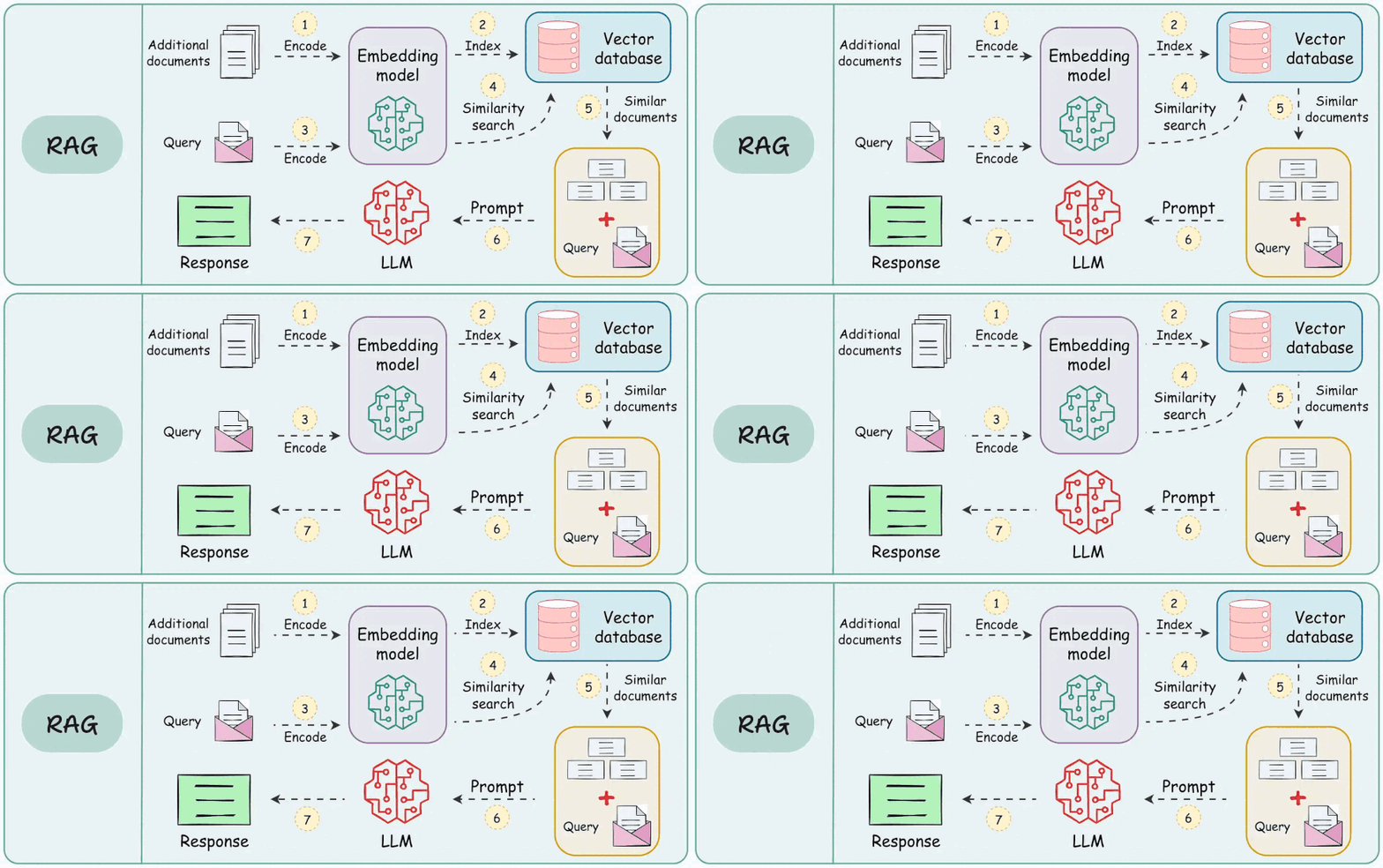
A typical RAG workflow includes four main components that work together to create grounded outputs.
1. Ingestion and Chunking
Raw content, such as PDFs, HTML pages, images, and notes, is converted into clean text and divided into meaningful chunks. Good chunking improves retrieval quality by keeping each segment coherent and context-rich.
2. Embedding and Indexing
Each chunk is converted into a numerical vector using an embedding model such as MiniLM, mpnet, OpenAI, and etc. These vectors are stored in a vector database like FAISS, LanceDB, MongoDB Atlas Search, Pinecone, Milvus, or Weaviate. This database acts as the memory used during retrieval.
3. Retrieval
When a user asks a question, the query is embedded and compared with stored vectors. Using similarity search, such as cosine similarity, the system selects the most relevant pieces of text. Retrieval quality has a major impact on the quality of the final answer.
4. Generation
The retrieved content is provided to a large language model such as Gemini, DeepSeek, OpenAI, Claude, Mistral, Cohere, Groq and etc. The model combines the retrieved information with its internal knowledge to generate a precise and context-aware response to the user’s question.
🚀 Build a RAG System (Step-by-Step)
🧭 Use Case:
In this scenario, we collect about 20 pages from the FAIR Data Innovations Hub website (fairdataihub.org) and save them locally as plain text files. We then ask the same questions using two approaches: No-RAG, where a local Llama model answers from general knowledge, and RAG, where the system first retrieves the most relevant website text chunks using Ollama embeddings + FAISS and then generates an answer based only on that retrieved context. Comparing the outputs side by side highlights how RAG produces answers that are more website-grounded and less likely to hallucinate—especially for site-specific details like leadership/team information, project names, and tool descriptions (e.g., Posters.science and DMP Chef).
🔧 Step 1 — Install Python dependencies (run once)
First, install all required packages from requirements.txt.
This ensures your environment has everything needed for web crawling, text processing, vector indexing (FAISS), and Ollama + LangChain integration.
🦙 Step 2 — Configure Ollama models (LLM + Embeddings)
In this step, we prepare the two “engines” we’ll use throughout the demo: one model to generate answers and one model to embed text for retrieval. We’ll use llama3.2 as the local chat model and nomic-embed-text to convert website text chunks into vectors (so FAISS can find the most relevant context later). Make sure both models are pulled in Ollama before running this step.
from langchain_ollama import ChatOllama, OllamaEmbeddings
from langchain_community.vectorstores import FAISS
from langchain_text_splitters import RecursiveCharacterTextSplitter
from langchain_community.document_loaders import TextLoader
# --- Choose models you have pulled via `ollama pull ...`
LLM_MODEL = "llama3.2"            # generation model
EMBED_MODEL = "nomic-embed-text"  # embeddings model (recommended)

# Initialize Ollama chat model
llm = ChatOllama(model=LLM_MODEL, temperature=0.2)

# Initialize Ollama embeddings model
embeddings = OllamaEmbeddings(model=EMBED_MODEL)

print("✅ Ollama models configured:", LLM_MODEL, "|", EMBED_MODEL)
🌐 Step 3 — Collect website content (crawl ~20 pages and save as .txt)
In this step, we “freeze” a small snapshot of the FAIR Data Innovations Hub website so our RAG system has something local to search. Starting from the homepage, we follow internal links (up to a small depth), download the HTML, strip away navigation/footers/scripts, and save the readable content as plain text files.
What this step does
- Starts from
https://fairdataihub.org/ - Collects up to 20 internal pages (keeps the demo small and fast)
- Cleans each page to keep the meaningful text
- Saves each page as a
.txtfile indata/fairdata_texts/
Output
At the end, you’ll have a local mini-corpus like:
data/fairdata_texts/01_home.txtdata/fairdata_texts/02_projects.txt- …
These files are the input for the next steps: chunk → embed → FAISS retrieval.
# Step 3: Crawl ~20 fairdataihub.org pages and save as .txt in data/fairdata_texts/

!pip -q install requests beautifulsoup4

import re
from collections import deque
from pathlib import Path
from urllib.parse import urljoin, urlparse

import requests
from bs4 import BeautifulSoup

START_URL = "https://fairdataihub.org/"
MAX_PAGES = 20
MAX_DEPTH = 2

OUT_DIR = Path("data/fairdata_texts")
OUT_DIR.mkdir(parents=True, exist_ok=True)

session = requests.Session()
session.headers.update({"User-Agent": "Mozilla/5.0 (fairdataihub-simple-rag)"})

SKIP_TERMS = ["login", "signin", "signup", "register", "account", "privacy", "terms", "cookie"]
SKIP_EXT = (".png", ".jpg", ".jpeg", ".gif", ".svg", ".webp", ".zip", ".mp4", ".pdf")

def normalize_url(u: str) -> str:
    return u.split("#", 1)[0].rstrip("/")

def is_fairdata_url(u: str) -> bool:
    return urlparse(u).netloc.endswith("fairdataihub.org")

def should_skip(u: str) -> bool:
    ul = u.lower()
    return any(t in ul for t in SKIP_TERMS) or ul.endswith(SKIP_EXT)

def slugify(u: str) -> str:
    p = urlparse(u).path.strip("/") or "home"
    p = re.sub(r"[^a-zA-Z0-9]+", "-", p).strip("-").lower()
    return p[:120] or "page"

def html_to_text(html: str) -> str:
    soup = BeautifulSoup(html, "html.parser")
    for tag in soup(["script", "style", "noscript", "svg", "iframe", "form"]):
        tag.decompose()
    for sel in ["header", "footer", "nav", "aside"]:
        for t in soup.find_all(sel):
            t.decompose()
    text = soup.get_text("\n", strip=True)
    text = re.sub(r"\n{3,}", "\n\n", text)
    return text.strip()

# 1) Collect internal URLs (BFS)
visited = set()
queue = deque([(START_URL, 0)])
urls = []

while queue and len(urls) < MAX_PAGES:
    url, depth = queue.popleft()
    url = normalize_url(url)

    if url in visited or depth > MAX_DEPTH:
        continue
    if not is_fairdata_url(url) or should_skip(url):
        continue

    visited.add(url)
    urls.append(url)

    try:
        r = session.get(url, timeout=20)
        if r.status_code != 200:
            continue
        ctype = r.headers.get("content-type", "").lower()
        if "text/html" not in ctype:
            continue

        soup = BeautifulSoup(r.text, "html.parser")
        for a in soup.find_all("a", href=True):
            nxt = normalize_url(urljoin(url, a["href"]))
            if is_fairdata_url(nxt) and not should_skip(nxt):
                queue.append((nxt, depth + 1))
    except Exception:
        pass

print(f"✅ Collected {len(urls)} URLs")

# 2) Save each page as .txt
for i, url in enumerate(urls, start=1):
    try:
        r = session.get(url, timeout=20)
        if r.status_code != 200:
            continue
        txt = html_to_text(r.text)
        out = OUT_DIR / f"{i:02d}_{slugify(url)}.txt"
        out.write_text(f"URL: {url}\n\n{txt}\n", encoding="utf-8")
        print(f"[{i:02d}] Saved -> {out.name}")
    except Exception as e:
        print(f"⚠️ Failed {url}: {e}")

print("\n✅ Done. Texts saved in:", OUT_DIR.resolve())
✂️ Step 4 — Split website text into chunks
In this step, we turn our saved .txt pages into small, searchable chunks. This matters because retrieval works much better when we search over short, focused pieces of text instead of entire web pages.
What this step does
- Loads all
.txtfiles fromdata/fairdata_texts/ - Wraps each file as a LangChain
Document(so we can track sources cleanly) - Splits the text into overlapping chunks (so important sentences aren’t cut off)
Recommended chunk settings (for this demo)
- chunk_size = 1000
- chunk_overlap = 150
Output
At the end you’ll have:
docs→ one document per pagechunks→ many smaller documents (these are what we embed and store in FAISS next)
# Step 4: Load saved .txt pages -> split into chunks

from pathlib import Path
from langchain_community.document_loaders import TextLoader
from langchain_text_splitters import RecursiveCharacterTextSplitter

!pip -q install langchain langchain-community

TXT_DIR = Path("data/fairdata_texts")
paths = sorted(TXT_DIR.glob("*.txt"))

if not paths:
    raise FileNotFoundError(f"No .txt files found in {TXT_DIR}. Run Step 1 first.")

# 1) Load documents
docs = []
for p in paths:
    d = TextLoader(str(p), encoding="utf-8").load()[0]
    d.metadata["source_file"] = p.name
    docs.append(d)

print(f"✅ Loaded {len(docs)} documents")

# 2) Split into chunks
text_splitter = RecursiveCharacterTextSplitter(
    chunk_size=1000,
    chunk_overlap=150,
    separators=["\n\n", "\n", " ", ""],
)

chunks = text_splitter.split_documents(docs)

print("✅ Total chunks:", len(chunks))
print("Sample chunk source:", chunks[0].metadata.get("source_file"))
print("Sample chunk text (first 250 chars):")
print(chunks[0].page_content[:250])
🧠 Step 5 — Embed chunks and build a FAISS index
Now we turn our text chunks into vectors (embeddings) and store them in a FAISS index. This is the “search engine” part of RAG—when a question comes in, FAISS helps us quickly find the most relevant chunks from the website snapshot.
What this step does
- Connects to your local Ollama server
- Uses an embedding model (e.g.,
nomic-embed-text) to embed each chunk - Builds a FAISS vectorstore for fast similarity search
- Optionally saves the index locally so you don’t have to rebuild it every time
Output
At the end, you’ll have:
vectorstore→ a FAISS-backed index of your website chunks- (optional) a saved folder like
faiss_index_fairdata/
Next, we’ll use vectorstore to retrieve context and compare No-RAG vs RAG answers.
# Step 5: Build FAISS vectorstore from chunks using Ollama embeddings

!pip -q install faiss-cpu

from langchain_community.vectorstores import FAISS
from langchain_community.embeddings import OllamaEmbeddings
import requests

BASE_URL = "http://localhost:11434"
EMBED_MODEL = "nomic-embed-text"  # or "mxbai-embed-large"

# Optional: check Ollama is reachable
try:
    r = requests.get(f"{BASE_URL}/api/tags", timeout=5)
    print("✅ Ollama reachable.")
except Exception as e:
    raise RuntimeError(
        f"Cannot reach Ollama at {BASE_URL}. "
        "Make sure Ollama is running (ollama serve). "
        f"Error: {e}"
    )

embeddings = OllamaEmbeddings(model=EMBED_MODEL, base_url=BASE_URL)

vectorstore = FAISS.from_documents(chunks, embeddings)

# Optional: save locally
INDEX_DIR = "faiss_index_fairdata"
vectorstore.save_local(INDEX_DIR)

print(f"✅ FAISS index built and saved to ./{INDEX_DIR}")
✅ Step 6 — Compare No-RAG vs RAG (same questions, different behavior)
This is the main demo: we ask the same questions twice and compare the outputs.
What this step does
- No-RAG: the LLM answers from general knowledge (fast, but may be vague or wrong).
- RAG: the system first retrieves relevant chunks from the FAISS index, then the LLM answers using only that retrieved website text.
How the comparison works
- We define two small functions:
- one that calls the LLM directly (No-RAG)
- one that retrieves top chunks (
k=5) and passes them as context (RAG)
- Then we run a short list of questions and print both answers side by side.
# Step 6: NO-RAG vs RAG answering

try:
    from langchain_ollama import ChatOllama
except Exception:
    from langchain_community.chat_models import ChatOllama

BASE_URL = "http://localhost:11434"
LLM_MODEL = "llama3.2"

llm = ChatOllama(model=LLM_MODEL, base_url=BASE_URL, temperature=0.2)

def answer_without_rag(question: str) -> str:
    prompt = f"""Answer the question as best you can.

If you are not sure, say "I am not sure" and do NOT invent details.

Question:
{question}

Answer:
"""
    return llm.invoke(prompt).content

def answer_with_rag(question: str, k: int = 5) -> str:
    retriever = vectorstore.as_retriever(search_kwargs={"k": k})
    retrieved = retriever.invoke(question)

    # keep context short to avoid overload
    context = "\n\n---\n\n".join(d.page_content for d in retrieved)

    prompt = f"""Answer the question using ONLY the website context below.
If the answer is not in the context, say: "Not found in the provided pages."

Website context:
{context}

Question:
{question}

Answer:
"""
    return llm.invoke(prompt).content


questions = [
    "What is FAIR Data Innovations Hub and what does it do?",
    "Who are the members of the FAIR Data Innovations Hub team?",
    "What is DMP chef and what does it do?",
    "List the main projects mentioned on the FAIR Data Innovations Hub website.",
]

for q in questions:
    print("\n" + "="*110)
    print("QUESTION:", q)

    print("\n--- NO RAG ---")
    print(answer_without_rag(q))

    print("\n--- WITH RAG ---")
    print(answer_with_rag(q, k=5))
Results — No-RAG vs RAG (side-by-side)
Below are the outputs from asking the same questions with No-RAG (LLM only) and RAG (LLM + retrieval over the downloaded website pages).
What we observed
Across all questions, the difference is consistent:
- No-RAG responded with “I am not sure.” for every question.
- RAG produced concrete, website-grounded answers because it could retrieve relevant text chunks from the local snapshot of
fairdataihub.org.
Example outputs
Q1: What is FAIR Data Innovations Hub and what does it do?
- No-RAG: I am not sure.
- RAG: Described the Hub as a platform providing tools and resources for FAIR data sharing, including interfaces and automation to help researchers manage and share FAIR/AI-ready datasets.
Q2: Who are the members of the FAIR Data Innovations Hub team?
- No-RAG: I am not sure who the specific members are.
- RAG: Listed specific names: Bhavesh Patel, Dorian Portillo, Sanjay Soundarajan.
Q3: What is DMP Chef and what does it do?
- No-RAG: I am not sure.
- RAG: Explained that DMP Chef helps researchers generate compliant, machine-actionable Data Management Plans quickly and tailored to grant proposals.
Q4: List the main projects mentioned on the FAIR Data Innovations Hub website.
- No-RAG: I am not sure.
- RAG: Returned a list of projects (e.g., SODA, AI-READI, Eye ACT, DMP Chef, Codefair).
Why this shows the power of RAG
These questions depend on site-specific facts (team members, project names, tool descriptions).
A standalone LLM often cannot answer reliably without access to the source. RAG fixes this by retrieving the relevant website text first—so the LLM can answer with confidence based on the provided context.
📚 Conclusion
RAG is a powerful approach for building AI systems that depend on trustworthy, interpretable, and domain-specific information. Whether you are creating research tools, clinical decision-support systems, or automated policy-generation workflows, RAG ensures that your AI remains dependable, accurate, and scalable. This is the same principle we apply in DMP-Chef to produce high-quality, NIH-compliant Data Management Plans.
✨ Acknowledgements
Some portions of this post were refined with the assistance of ChatGPT’s writing tools.