

Product
Tuesday, December 23, 2025
Alt-Text-Generator Gets a Truly Open Source Brain

The Alt-Text-Generator has been one of our more popular open source projects since its release, helping developers and users automatically generate image descriptions to make the web more accessible. The idea was simple: feed it an image URL, get back a natural language description suitable for alt text. No manual writing required.
The tool lives at alt.fairdataihub.org and has served its purpose well, but we've always wanted to take it further. The original implementation relied on cloud APIs, which meant images left your machine and usage costs could add up. We wanted something users could run entirely on their own hardware, with no external dependencies and no data leaving the building.
🖼️ Why Alt Text Matters
Alt text (alternative text) describes images for screen readers, search engines, and situations where images can't be displayed. For scientific publications, datasets, and web content, meaningful alt text is essential for accessibility and discoverability. Yet writing descriptive alt text for hundreds of figures, charts, and photographs is time-consuming work that often gets skipped. This is exactly the kind of tedious-but-important task where AI can help, and that's what motivated the Alt-Text-Generator in the first place.
🔓 From API Calls to Local Inference
The original Alt-Text-Generator used Salesforce's BLIP model through Replicate, a cloud-based inference service. While this approach works well, it comes with trade-offs. Images get sent to third-party servers, which raises privacy considerations for sensitive research data. Heavy usage requires paid API accounts, and the whole system depends on external service availability.
The new Ollama-based service changes this equation entirely. Ollama is an open source tool that runs large language models locally, and it now supports vision-language models capable of understanding images. By routing inference through Ollama, the Alt-Text-Generator can now operate completely offline, keeping your images on your own hardware.
⚡ Zero ML Dependencies
One of the most significant advantages of the Ollama approach is the minimal Python footprint. Traditional vision-language model setups require PyTorch, Transformers, and various CUDA libraries, often totaling 5-10GB of Python dependencies alone. Anyone who has wrestled with conflicting package versions in a research environment knows how painful this can be.
The Ollama service sidesteps all of this. The entire Python server needs just Flask and Requests:
pip install flask requests
Ollama handles all the model inference externally, so your Python environment stays lean. The vision model itself (qwen3-vl at 4 billion parameters) weighs in at 3.3GB and downloads once through Ollama's model management system. Compare this to the 10GB+ footprint of a typical Transformers-based setup, and the difference becomes clear.
📊 Comparison
| Aspect | Replicate (Cloud) | Ollama (Local) |
|---|---|---|
| Python dependencies | Minimal (API client) | Minimal (Flask + Requests) |
| Model hosting | Cloud (Replicate) | Local (Ollama) |
| Privacy | Images sent externally | Images stay local |
| Cost | Per-request pricing | Free after setup |
| Offline capable | No | Yes |
| Model size | N/A | 3.3 GB |
🚀 Getting Started
Setting up the Ollama-based Alt-Text-Generator takes just a few minutes. Ollama runs on macOS, Linux, and Windows, and the install script below works for macOS and Linux. Windows users can download the installer from ollama.com. You'll need Ollama 0.4.0 or later for vision model support.
First, open a Terminal and run these commands to install Ollama and pull the vision model:
curl -fsSL https://ollama.com/install.sh | sh
ollama pull qwen3-vl:4b
Next, clone the Alt-Text-Generator repository:
git clone https://github.com/fairdataihub/alt-text-generator.git
cd alt-text-generator
Set up a Python environment (using conda or venv) and install the dependencies:
pip install flask requests
Then start the Flask server:
python ollama_service/server.py
You can now generate alt text by passing an image URL to the API. The service fetches the image, sends it to your local Ollama instance, and returns a concise, natural description suitable for use as alt text:
curl "http://localhost:5000/generate?imageUrl=https://fairdataihub.org/images/blog/ismb-2025/dorian-team.jpeg"
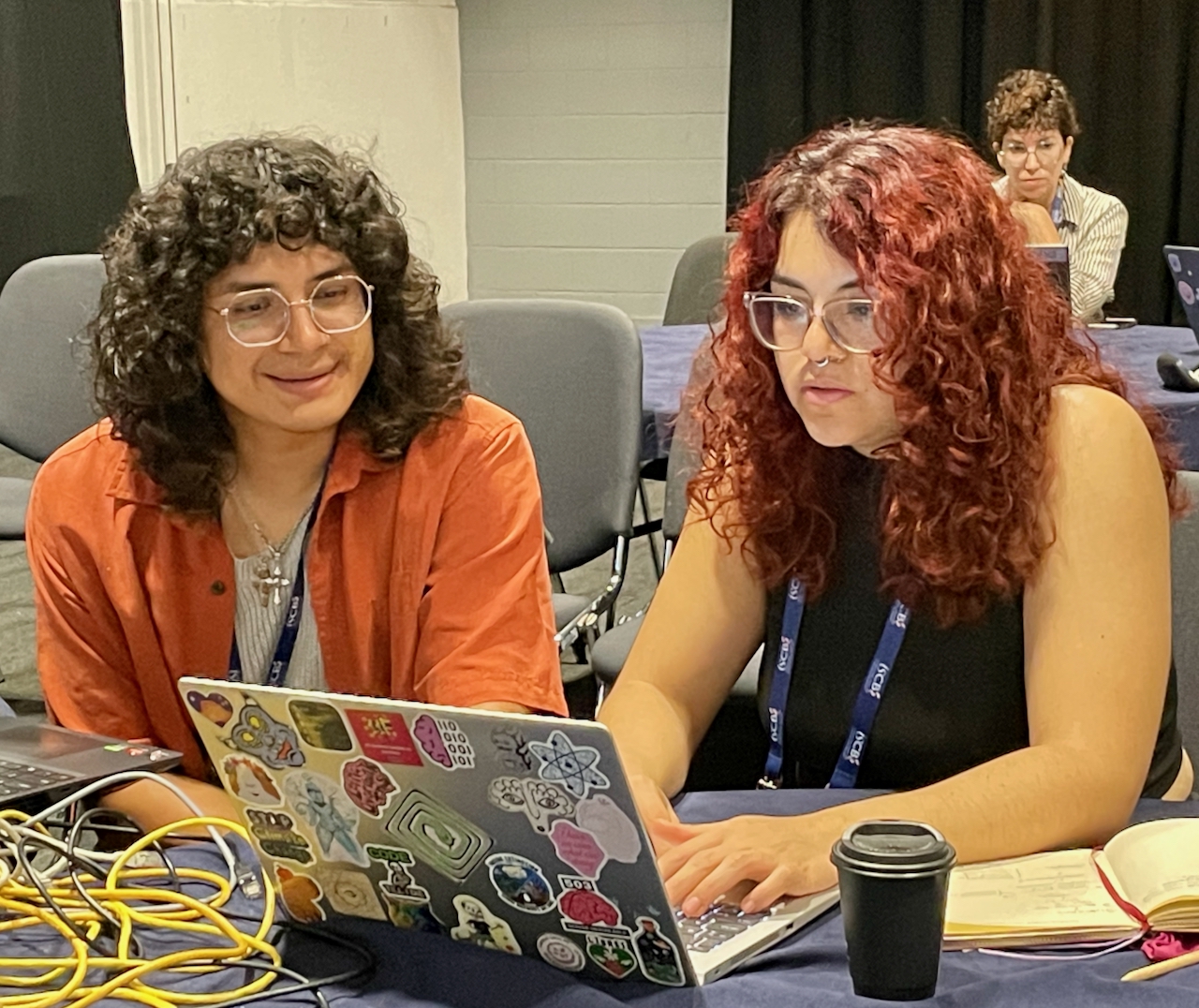
Generated alt text: "Two people with curly hair and glasses sit at a table working on laptops, surrounded by cables and a coffee cup, with a third person visible in the background."
🔒 Built with Security in Mind
Running a service that fetches arbitrary URLs requires careful attention to security. The Alt-Text-Generator includes several safeguards against common vulnerabilities. URL validation blocks requests to internal network resources, preventing SSRF attacks that could probe your local infrastructure. The service validates content types before processing, accepting only standard image formats like JPEG, PNG, GIF, and WebP. Size limits prevent memory exhaustion from oversized images, and error messages returned to clients are sanitized to avoid leaking internal details while still logging full exception information server-side for debugging.
🔮 What's Next
The Ollama backend opens possibilities for experimentation with different vision-language models. The default is qwen3-vl:4b, but as new models become available through Ollama, switching is as simple as setting the OLLAMA_MODEL environment variable:
OLLAMA_MODEL=minicpm-v python ollama_service/server.py
We're also exploring batch processing for generating alt text across entire datasets, which would be particularly useful for researchers preparing large collections of figures for publication or archival.
Whether you're building accessible documentation, curating research datasets, or developing applications that need image descriptions, the Alt-Text-Generator now offers a path that's open from end to end.
📢 Try It Out
Check out the Alt-Text-Generator on GitHub and the new ollama_service/ directory for the local inference option. If you find it useful, consider giving the repository a star. A cloud-hosted version is coming soon.
Acknowledgements
The original repository was created by Vercel.